Hello,
I don’t know if it’s a bug, but I can no longer see the slider to select the number of hours per week in the plan builder.
Thank you
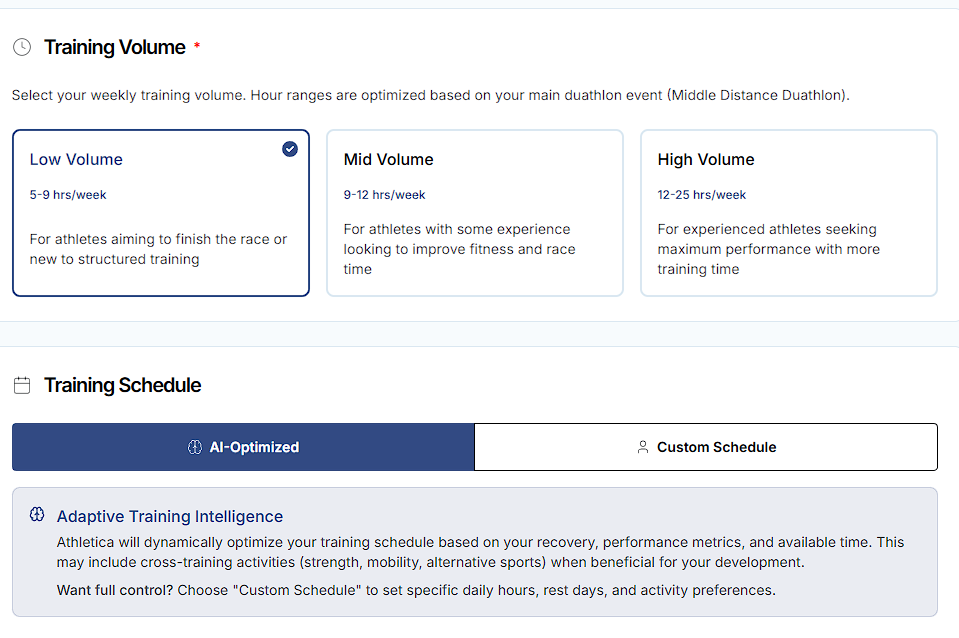
For now, yes it’s gone, and not sure if it’s coming back but personally I found that the AI just used that as a rough guideline anyway! I’d set at 6 or 8 hours for example when coming off some illness/injury and it would vary from 7-10 still to get the mix of activities to hit my goals. Long way of saying that with or without the slider, I saw the same hours 
I’d recommend just going with the closest one, use the workout wizard to replace workouts as needed, and feel free to delete extras (my approach is to get the key HIIT sessions in and at least some of each category like strength and aerobic, and delete those that’re duplicated like a second or third aerobic or long session).
PS. You can use the “custom schedule” to get closer, but remember per other threads, if you put too many constraints like setting 6 hours on a Saturday, it may assume that you’re asking for 6 hours on Saturday not just available for that much on Saturday. I believe it’s something the team is working on updating and clarifying - but of course is not top priority while they work on ironing out the plan builder and other items from the recent overhaul. fwiw
Dear @Dafftt
We have removed the slider. Your weekly hours are determined by low-mid-high volume choices depending on your sport and race goal.
If you have 7 hrs per week to train, you’ll simply pick “low volume”.
MJ
1 Like
Thank you,
What should I do when my training volume is 5-6 hours and the plan gives me weeks of 9 and 10 hours?
1 Like
@Dafftt since you are on duathlon plan - low volume is 5-9 based on your race day demands. If you only have 5-6 hours available, you can down adjust the ramp rate in your Plan builder step 4
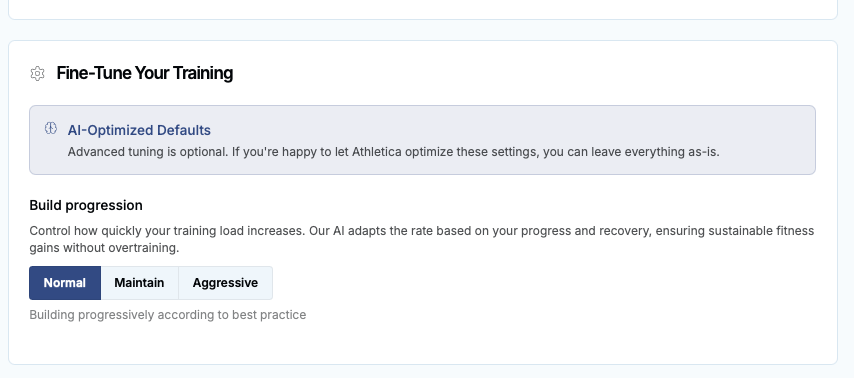
Try that and see your plan changes. Other than that, you can create a rest day if volume is too high.
Best, MJ
1 Like
I noticed this too! It looks like they’ve moved away from the old slider in favor of the new availability settings. If you want to adjust your volume now, you usually have to go into Settings > Training and tweak your ‘Daily Availability’ or switch between the Low/Mid/High volume templates. It’s a bit of a change, but it seems to be how the new AI logic builds the weeks now.
these features were already present before
Hey all,
I set up my plan using the iOS app and had selected “Let AI decide” for the training volume. Now, the web app shows Low Volume option as selected for my plan and there is no AI automated option for training volume on the web app. So my doubt is, will this low option volume remain static throughout my plan? (which is of 37 weeks) or will it shift to Medium or High as the plan progresses? Also, why is there no AI adjusted volume option on the web app?