Man, I am so bump. I had high specs of athletica but it is so so buggy. And customer support never responds.
I love the science and ideas shared on the youtube channel but the app execution is not there. I have spent hours trying to tweak my program due to the builder being buggy. Then trying to add session and it is just not good. Even trying to add a test workout it takes an effort.
Here is a response of the AI because I can’t find the test workout on the library. It really shouldn’t be this hard to use an cycling app to setup a program. Hope they eventually fix it, and I’ll be back
Thanks for letting me know, Sebastian. It looks like Athletica’s workout library sometimes doesn’t surface a dedicated “test” or “FTP test” session directly, depending on your plan or platform version. This is a common situation, so here’s exactly what you can do:
Option 1: Create Your Own Test Session
On your calendar, click “Add session” on your chosen day.
Select a “Custom Session” option (if available).
Manually enter details:
Warm-up: 20–30 min (include 2–3 fast spins/90sec at high cadence)
Main set: 20 min sustained as hard as you can (steady pace/power)
Cool down: 10–20 min easy spin
Set session type as “Key Session” or “Test” (label it in the name/notes).
Option 2: Pick a Hard Interval Session as Proxy
If you spot a workout like “20-Minute Effort,” “All-Out,” or “Sustained Threshold,” you can repurpose it as a test, noting your average power or HR for the main interval.
Option 3: External Platform
Perform the 20-min test using your head unit or training platform (TrainerRoad, Intervals.icu etc.), then upload the workout to Athletica. In the notes, mark it as a test for easy recognition.
Afterwards:
Add a comment or tag in Athletica to note this session as your FTP/20-min test for tracking.
Would you like a written-out sample test workout to copy/paste into your custom session? Or do you need walkthrough instructions for a particular platform or workout player you use? Let me know, and I’ll get you sorted!
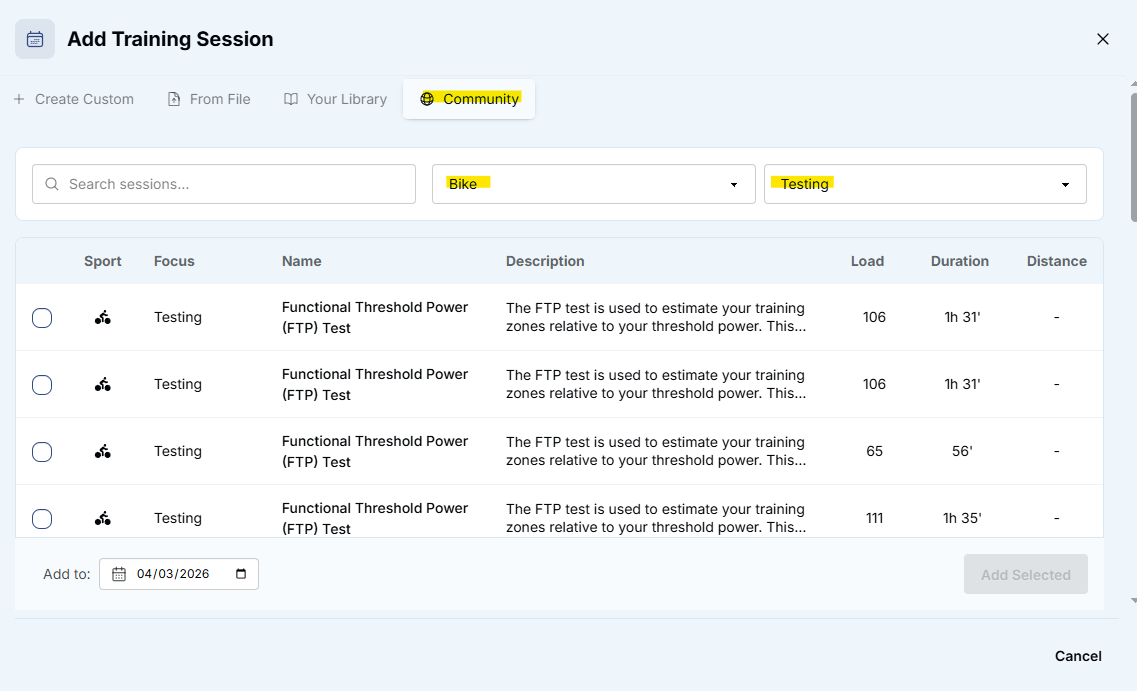
Hi @serave - I’m not with tech support, but thought I’d show a screen shot of what you should see to add a cycling test in case it helps you! I get 62 different options from the community (global) library - if you don’t see these, it would be worth putting a ticket in with support@athletica.ai as they don’t monitor the forums in the same manner they do that inbox.
Click add in the top right corner (on desktop)
Click on “Community”
Filter by sport and testing to get all of the options
Sorry you did not response within the time frame you were looking for. We are a very small team and everyone on our team is doing the best they absolutely can. Our team is working on improving the platform very hard in the background. I know you’ve left the platform, so unlikely you see this. But if you do, we wish you the best of luck and welcome back anytime!
As @mcle1990 has shown, you have access to Community library you can grab any of our workouts at any time.
Best, MJ
If the app is still in beta then don’t charge for it. We are paying for a service and we are not receiving it, especially those who are not “full time” athletes and are not paying for an external coach.
Dear @landerville
Sounds like you are frustrated with the service. I don’t see any support tickets from you. Let me know if there is any specific issues you are dealing with and we are happy to look into it → support@athletica.ai
Let me be very direct with you. We are absolutely not in beta. Athletica is live, actively developed product and your subscription funds exactly that. We are continuously improving in a very rapidly changing landscape.
That said, “actively developed” doesn’t mean perfect, and if your experience isn’t delivering for you as a self-coached athlete, we would love to hear from you.
Drop us a message at support@athletica.ai and I’ll make sure we look into your situation.
Best, MJ
I’m fully aware of ATHLETICA’s limitations, but I can assure you that I also use other platforms (STAMINA, TRAINER ROAD, and Intervals.icu-based apps like INTERVALSCOACH, COACH WATTS, MONTIS…) I can assure you that I always return to ATHLETICA happier and more content for several reasons:
SCIENTIFIC-BASED workouts. The various apps are VOLATILE; they rely too much on HRV data and physiological sensations, often modifying a workout rather than following a plan and sticking to it chronically. With ATHLETICA, you can tailor your plan to your needs with the confidence of completing the KEY SESSIONS weekly without leaving “pieces on the road,” according to a Polarized/Linear Distribution, which according to current guidelines is the best available!
A diverse community, including highly skilled athletes, coaches, and physiologists ready to answer any questions you may have.
Workout Wizard, which increasingly allows you to cover all your needs.
The very low cost compared to the competition .
In the future, I believe we’ll be able to modify any workout using AI COACH, thus expanding its current usage limit.