Is there a way, or something planned for the future, to mark a day as a rest day or lower workout day? I’m assuming the latter will be back with the wizard. Right now I’m dealing with an injury and family in town this weekend so my plan will get disrupted. However, I also like seeing what next week looks like with workouts in advance, so waiting for the plan to update after just not doing the planned workouts is too last minute for me. I tried just deleting workouts on some days but they get added back in.
1 Like
You can manually delete the scheduled workout or add a recovery one from the library. If it’s locked (which ones you add are by default) the AI won’t adjust it
1 Like
Nope, AI keeps adding more back in after I delete them.
Hey Ashley,
if you don’t like last minute changes, then please adjust these settings under Account-preferences:
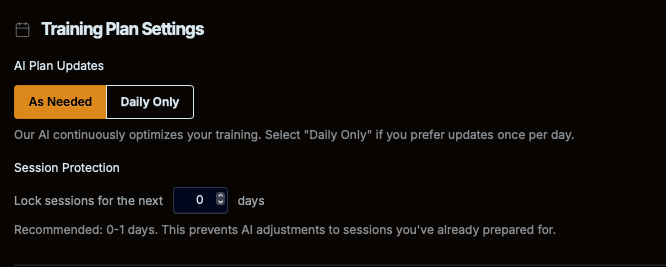
Use “Daily”, and protect sessions for 1-2 days if you don’t any AI adjustments to happen tomorrow or the next day.
Best, MJ
That’s fine for short term changes, but if I know I’m going to be out or not training for a few days and then want to plan for next week’s workouts (scheduling and weather wise) it doesn’t work. Also, normally I do want to have immediate changes. This is a separate issue.
If I could mark a day in the future where I’m not available to train, independent from that setting and independent from the normal weekly availability, then the AI will be changing more workouts less.