Hi, from the v2 update - athletica.ai is wrong, I’m getting the same training plan -static one - nothing is changed, workout won’t increase/decrease via overload, I can’t see any warning to futures workouts.
the new ui is nice, but athletica.ai is become to be training peaks.
I’m training for full Ironman , and looking for ai adapting training and not static one - do I missed something ?
so I have an full distance iron man plan , in the old Athletica I was able to see the future changes in the training program, since the update there have been no changes to the program, it seems completely static, I don’t see any change in the plan , there is no worrying for overload , is jest a plan.
@liorra3 - are you talking about where Athletica used to show a little red “warning” indicator and then the change (either adding volume / time or decreasing volume time) based on your form / fatigue/ etc. so you could see how your plan was adapating to you each week?
Yea , but it’s even worse - coz the training is not adapting any more , for example- if I have a 2:15h of running in the weekend - it’s will stay same , even I will do super hard work a day or two before .
If this is the case @liorra3 and @mcle1990 I need you to do your best to document it with screenshots and clear descriptions and send an email to us support@athletica.ai for our team to investigate. Try to be as clear and descriptive as possible, including screenshots of workouts before, deviations from planned workouts and what you’d expect would happen to your next sessions.
Looks the same for me, if I add my Sunday 11k run manually from the library, which I do with friends, Athletica.ai does not do any adjustments. It even keeps the interval session (whichvis unlocked) at the same day.
This is something I assume an AI should be able to compensate.
Also it seems deleting session does not have much effect and for some days I even get the warning “Update failed’“ which also asks me to restart the training calculation. Well after that my manually added sessions are gone again.
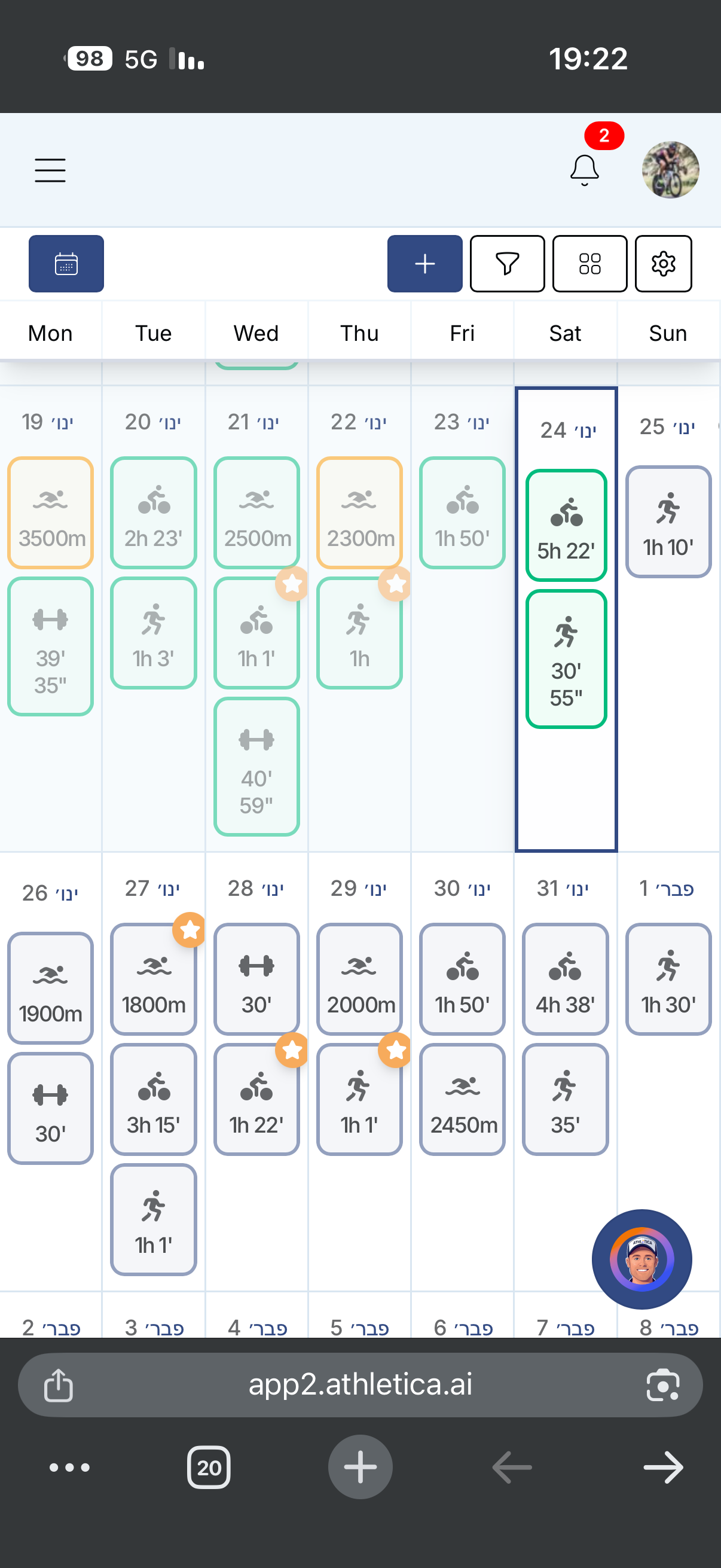
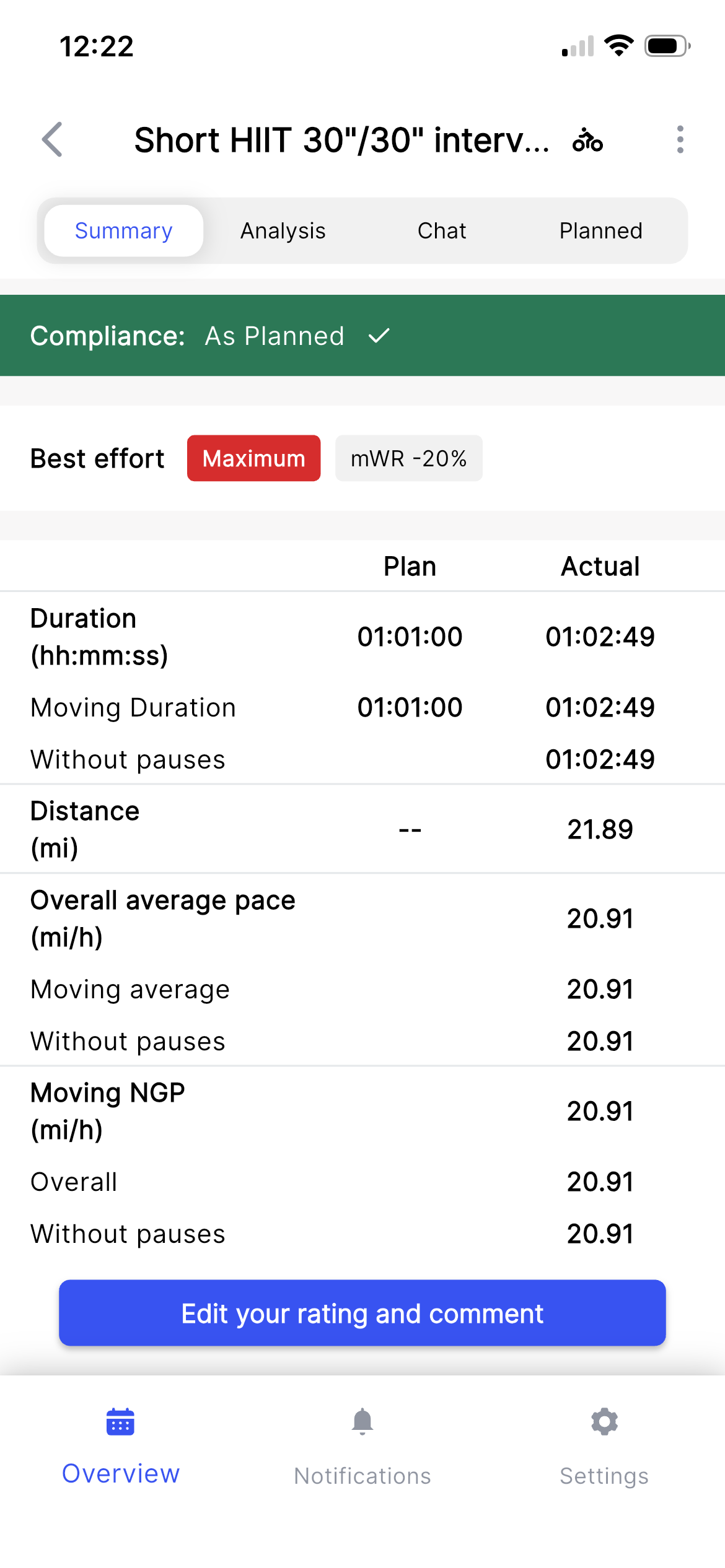
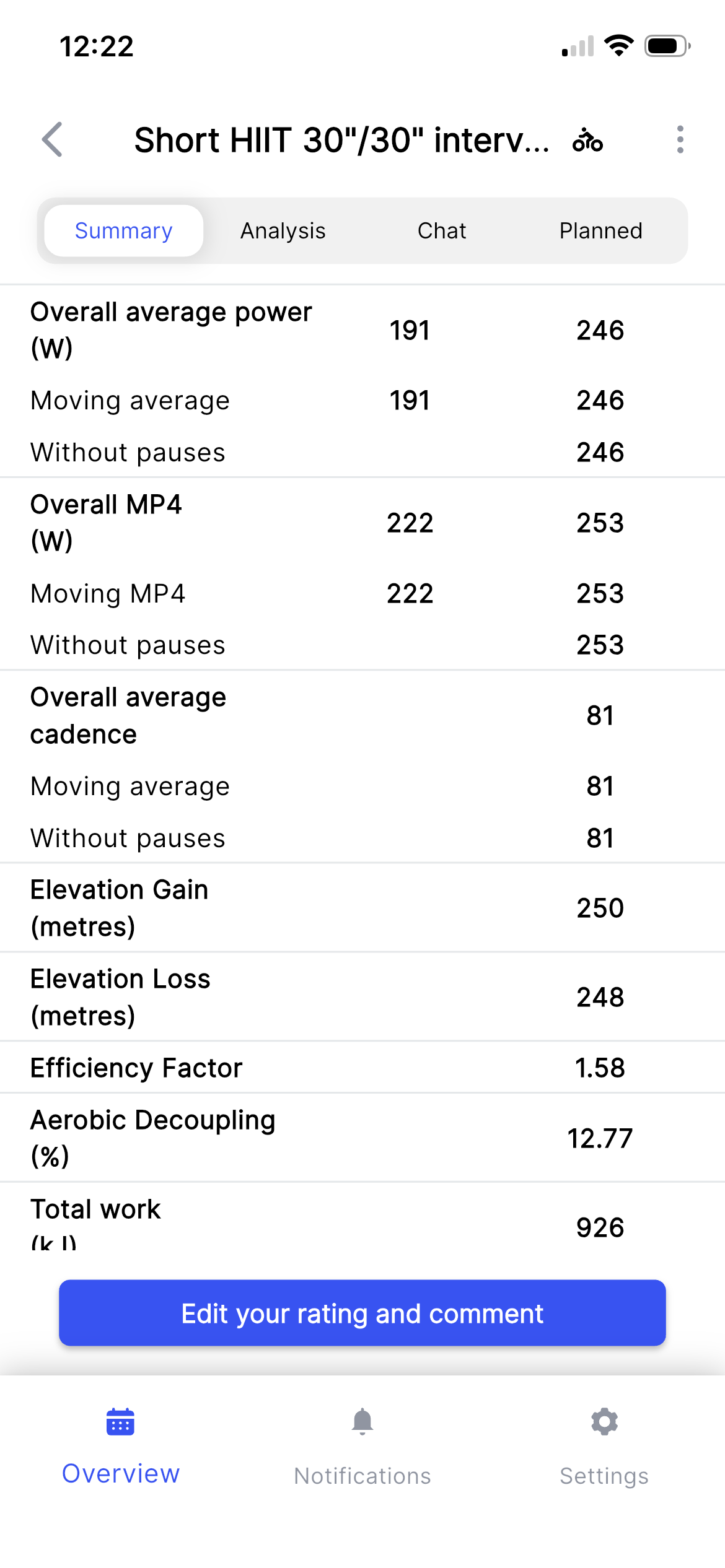
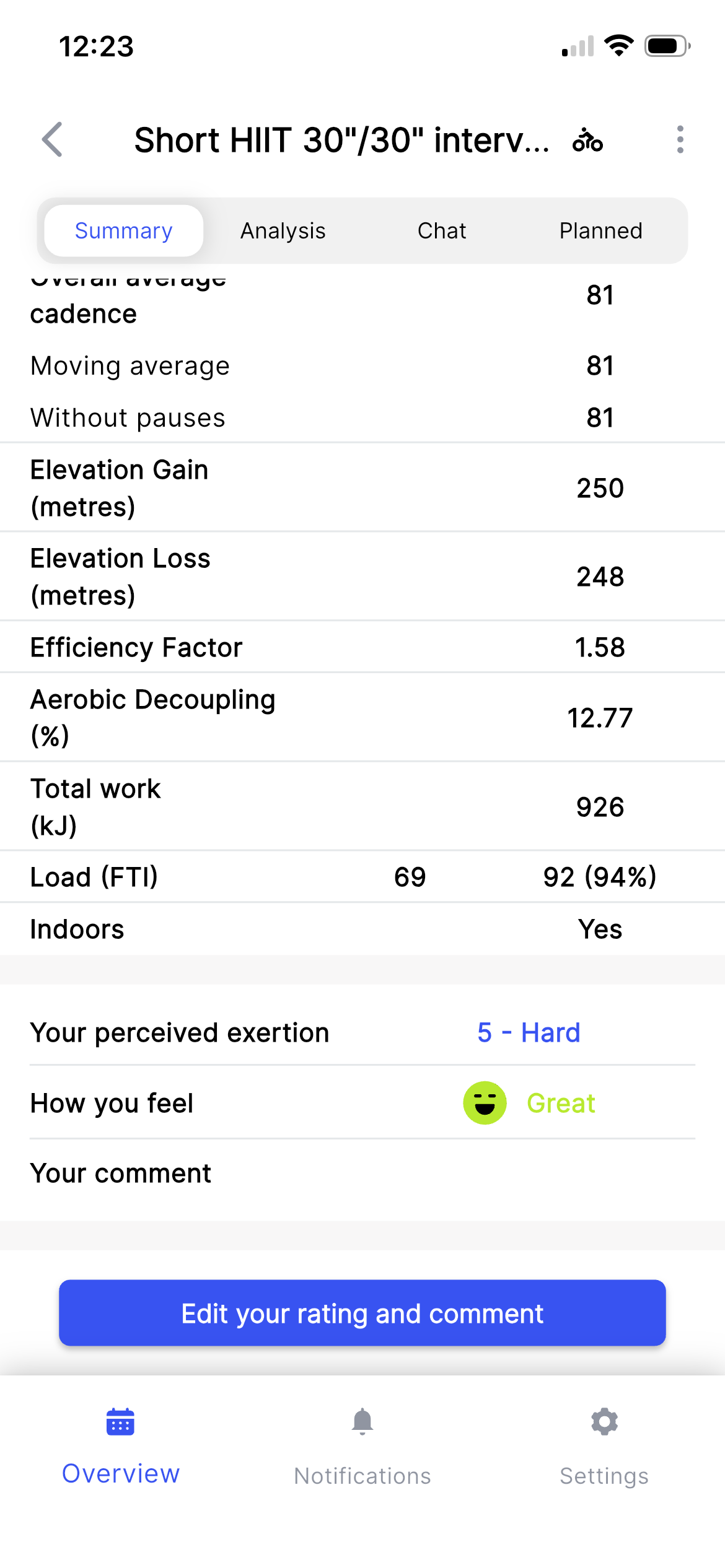
I did send this in a support ticket, but documenting here for awareness and perhaps more satisfactory responsiveness: Something I’ve noticed since the roll-out of the new Athletica this year is that my loads do not seem to be adjusting with the work that I’m doing during the week. I wanted to get a specific example (and my coach asked for this too, so I’m cc’ing him) as an illustration, and I’ve seen it again this week. I’m currently only doing two days of cycling per week, and what was prescribed this week was a short HIIT session of approximately 1hr and load of 69 on Weds. and a 3hr. Z2 ride with a load of 113 on Sat. As you can see in the photos attached, I went way beyond the load prescribed for Weds. (load 92 vs 69), but this didn’t change the duration nor intensity of the Z2 ride. on Sat. I have no other rides or workouts that would be affected, and I’ve seen that my climbing and strength workouts don’t affect the cycling loads at all anyway, so I’m setting those aside for the moment (though I wonder about that too).
I received a response to this from Paul L that basically misinterpreted what I was asking about, explaining that because my available training hours were capped at a maintenance level, Athletica was intentionally prevented from increasing future loads—even when I overshoot a session, but he did not address:
Whether Athletica should still down-regulate or adjust upcoming sessions in response to unexpectedly high fatigue or load within a maintenance plan.
Whether acute overreaching on one day should influence the distribution or intensity of remaining workouts, even if total weekly volume is fixed.
My broader concern about the platform’s usefulness for day-to-day autoregulation, not just long-term fitness trending.
So, my hope is that the Athletica team can hear, and understand, what their customer base is telling them, and address a very real issue the platform has.
Dear @Dafftt
I’ve reviewed your training plan. The past 8 weeks, you’ve generated several plans - from mid-distance triathlon, to marathon to duathlon to half marathon. Your executed weekly volume has been between 30mins to 4 hours. I understand that you’ve been sick, but I really don’t understand what are you expecting from the planning perspective? The program is trying really hard to modify to you, but if you cannot put in the work, it’s limited on what it actually can do in terms of adapting the sessions. At some point, the GPS unit will tell you: “well, this was the best I can do, good luck finding home”. Remember, the Machine Learning is learning what you are actually executing, and it hasn’t been much the past 8 weeks. You’ve got to give the program something to chew on.
Changing the plan will also change the required volume for example, low volume mid-distance triathlon is obviously higher than low volume marathon.
The 3x10min SE session is a prime example on how the adaptive program is trying to get you back on track by increasing load due to missed sessions while still trying to keep you within safety guardrails.
We are going to bring back the “original session” details, but in the meantime, your Athletica Coach will tell you what changes has been made to your program.
If I were you Hugo, I would focus on getting consistent. Good luck,
MJ
Note that Athletica does not apply adaptations to any workouts that you bring in manually, for example your 11K runs. I am not sure what exactly happened to your other workout of the day as I don’t see it in your calendar. However, your Monday’s are set to downgrade the load and are recovery focused. What are you expecting would happen? Are you expecting that if you add a session that AI will delete your existing one? That is not what AI will do - the human will stay in control and it is up to you to delete an original session if you add one.
Update failed is a message from the system: did you know that your plan updates and recalculated every single time you move, delete, sync workouts, etc etc? the message you are seeing is an indicator that something has in fact happened. You do not need to restart the plan calculation, just exit the note. Admittedly, it is a bit confusing and we will change the message.
Sorry you are having issues with your experience. We have a lot of work to do in improving, and we appreciate all of you who are voicing issues.
MJ
So I saw your ticket coming in. Please correct me if I’m wrong:
You did your Wednesday HIIT session and knocked it out of the park, which lead to higher than planned overall load 92 vs. 69.
Then you were expecting your Saturday ride to be adapted based on your higher than planned Wednesday session, am I right?
In the meantime, your Thursday session is a strength training ( I don’t see a load) and Friday is Indoor climbing session.
I respectfully disagree with your assumption that your Saturday session should be altered at all. There is 72 hrs in between your Wednesday session and Saturday with two days of low load days. You have absolutely enough time to recover from the HIIT session for 3 hr bike ride. Physiologically, you should be fully recovered even though you went harder than planned, but those two easy days in between definitely would allow you to absorb it. It would be a different situation if your long ride was the day after your HIIT. Also looking at your fatigue and form numbers: you’re definitely not digging yourself in to a hole here.
Yes, absolutely, if there is a concern of acute overreaching, then the next few days would be adjusted - but there was no base to do so in your case. Remember though, you always override the system based on your intuition and how you feel. Are you feeling tanked, extra fatigued, of course listen to that and adjust manually.
I hope you feel heard and understood. It is important to us that you do.
Kindly, MJ
If this is the case here, then I’d say the original 3hrs ride was too easy.
I mean: a non-planned workout is objectively an extra load and it should be taken into account, even if the athlete has time enough for recovery. The long ride load can’t be the same, so it’s one or the other: the original load was too easy before the extra workout or it’s too hard with the extra workout done.
Thanks @joe but you’d have to get the entire context here.
HIIT session was not unplanned session and he went slightly over- I think it was a great stint based on his overall load otherwise. I don’t have the original long ride duration or load - before the HIIT session so I don’t actually know if there was any adaptations here prior. But looks like overall very easy week and Fatigue and Form numbers definitely not alarming.
Thanks, Marianna, for directly addressing the concerns I’ve raised. The rationale you provided for what I’m seeing on the platform makes some sense, and helps me understand what posture I should have towards it at this stage in my training.
We are working on a solution to visualize the changes that are happening in regards to your sessions. Apologies it has been confusing.
There are may calculations and adaptations that are happening any time you make a change or bring your workouts in- we just haven’t shown it the same way as we did on the old UI.
It has become apparent that our users really want to see those.
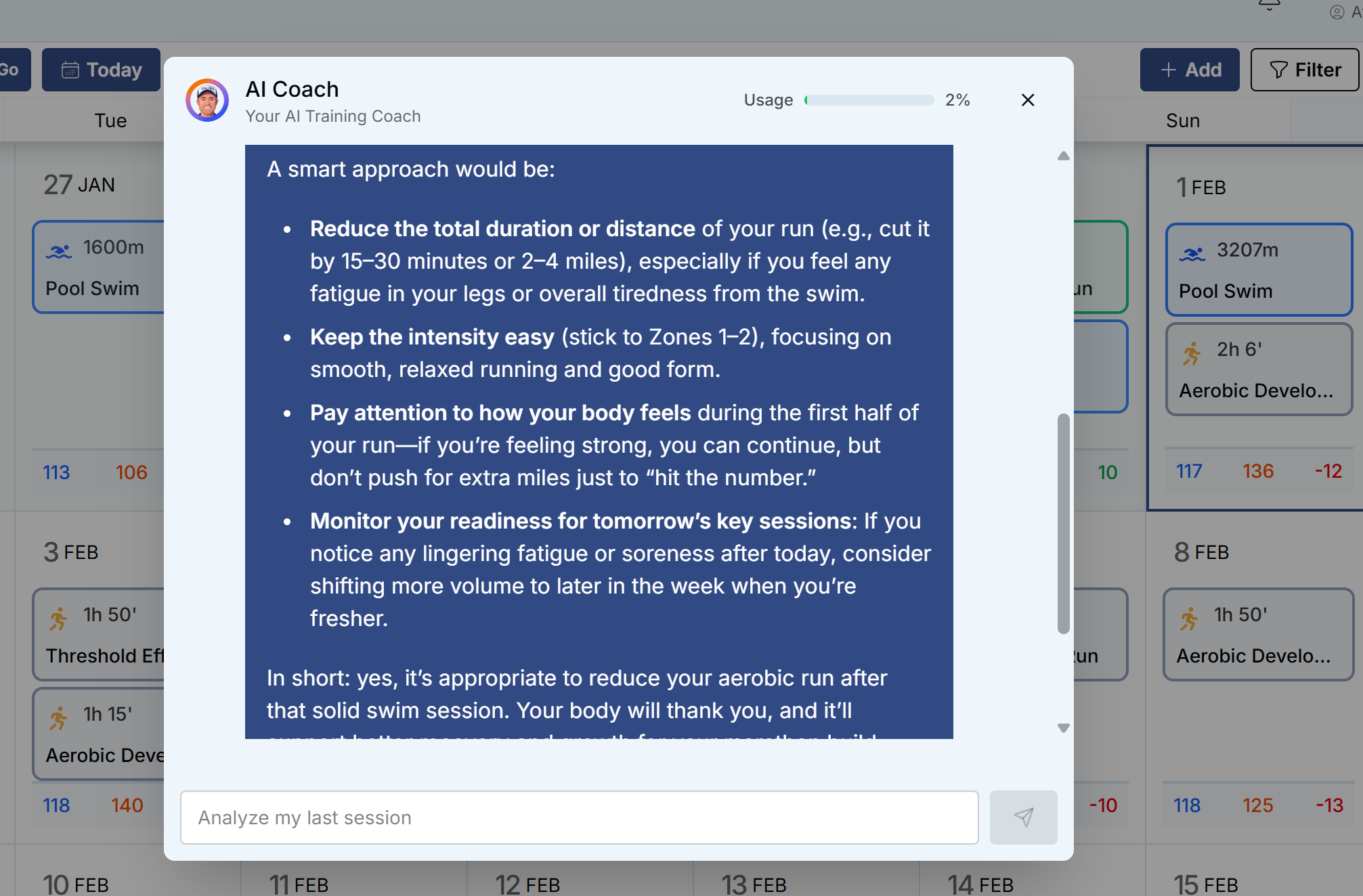
At the moment, you can ask your Athletica AI coach.
Just as a kind of example of how the AI coach should/can be used (and also because I was very impressed this morning in my first real go of using it.)
I had a big weekend of running planned on my marathon training plan. 23 miles Saturday, 2 hours on Sunday. Due to me also wanting to keep my triathlon fitness up I threw in a 40km bike on Saturday and also had a 2 hour coaching swim session booked this morning.
I got back and asked the coach “Should I reduce my run today after my unplanned swim this morning?” and this was part of the response. Absolutely perfect and despite me kinda knowing this is what I would do anyway, having it confirmed was great mentally
In lieu of the workout wizard I’ve used the AI Coach to suggest cross training workouts on days where it’s not safe to run outdoors. It’s been a fine substitute. And it’s been helpful in fitting in, and planning around, non plan activities like team sports. In general I’ve found it to be a good temporary fill in for some of the features that aren’t yet back.