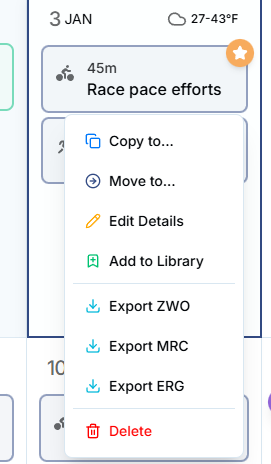
Hello, now that the mobile web page appears locked to the new AI, I cannot find how to unlock workouts to allow them to be adjusted.
Whenever I move workouts around using the mobile app, they automatically lock. Previously I could access the website through my phones browser to unlock the workout (allowing AI to adjust/alter it as needed). With the new UI (which I love btw), I can no longer unlock the workouts.
I know they are still being locked as I can see the padlock closed when I access the old UI via PC desktop browser.
@Jack please use the feedback button inside the new UI you are testing to give the team feedback. The tech team is not monitoring forum. Thank you so much
MJ
At the top if on a web browser there is a button that says “old UI” and beside it is a “feedback” button. If you are on a phone - I don’t think you see that button…
Today is my first day looking at the new web UI and I also don’t see anyway to unlock the workout? I changed the settings in my session protection to 0 but still can’t edit?
Edit: it did allow me to after changing to 0 but after a few refreshes and it doesn’t seem to be predictable. This on a Win 11 PC (24H2) and latest Chrome browser.
Ideally I like having it locked on 1 but also like the ability to edit the session day off if I need to… old interface had the lock icon you clicked to simply unlock it? Am I missing the lock button somewhere or is this a feature not in this UI?