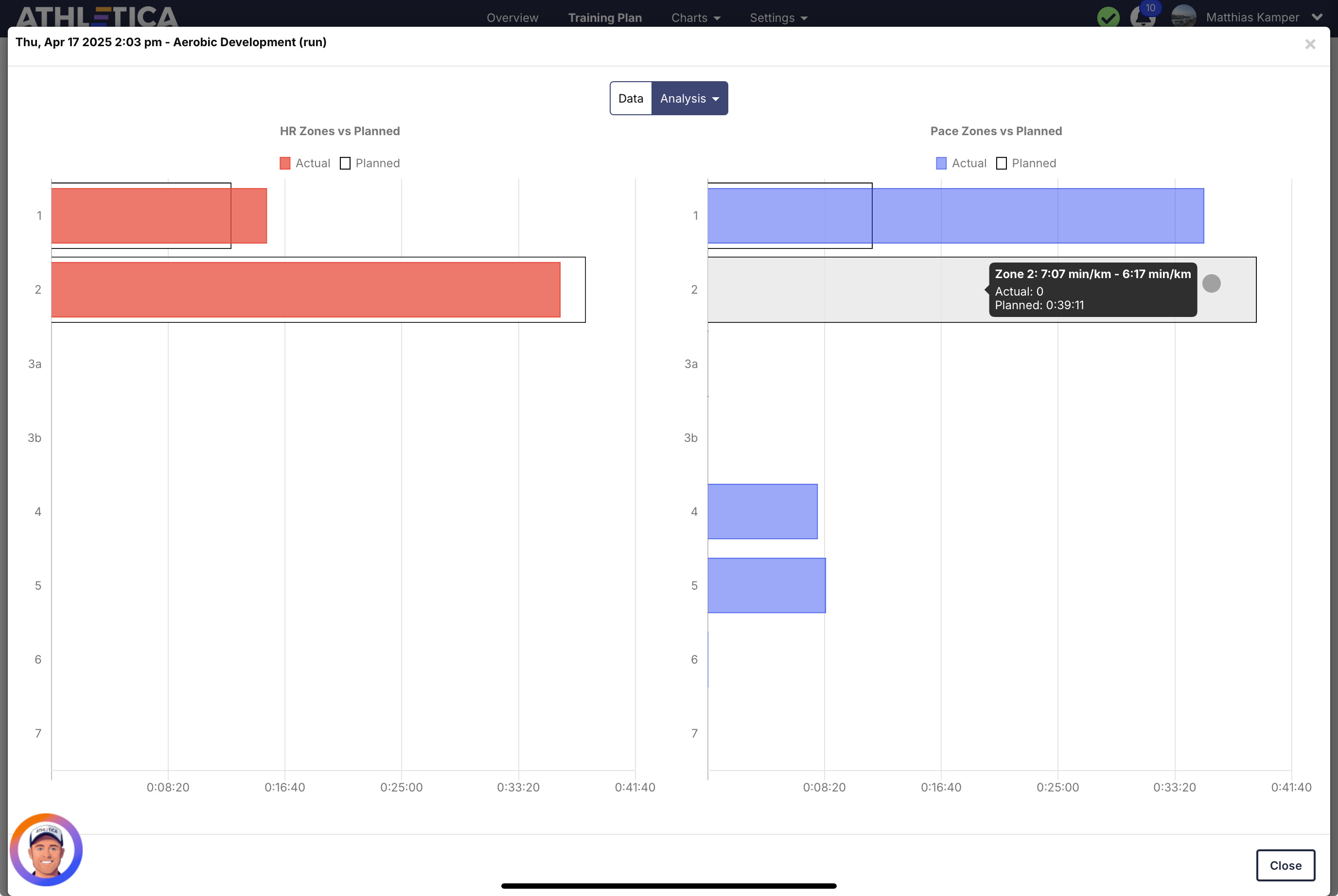
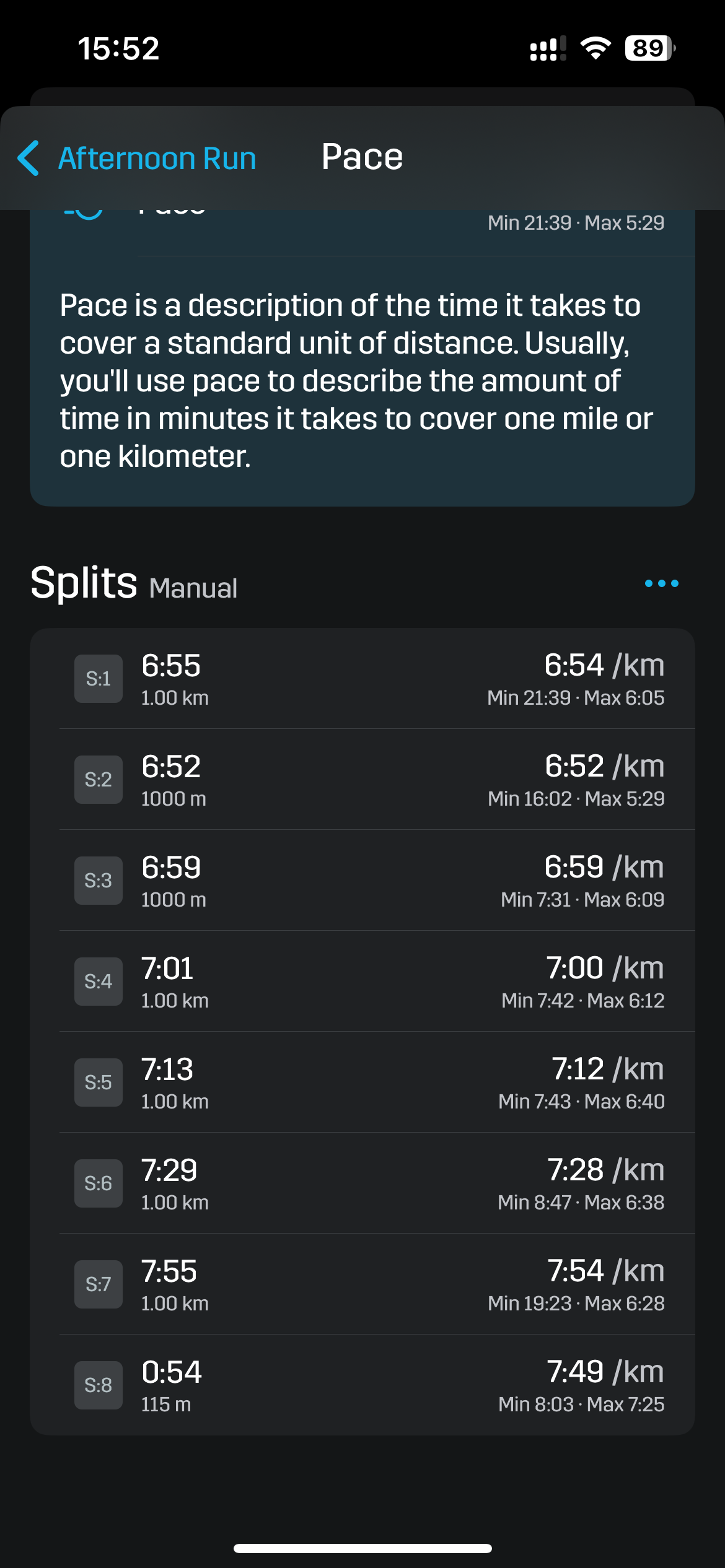
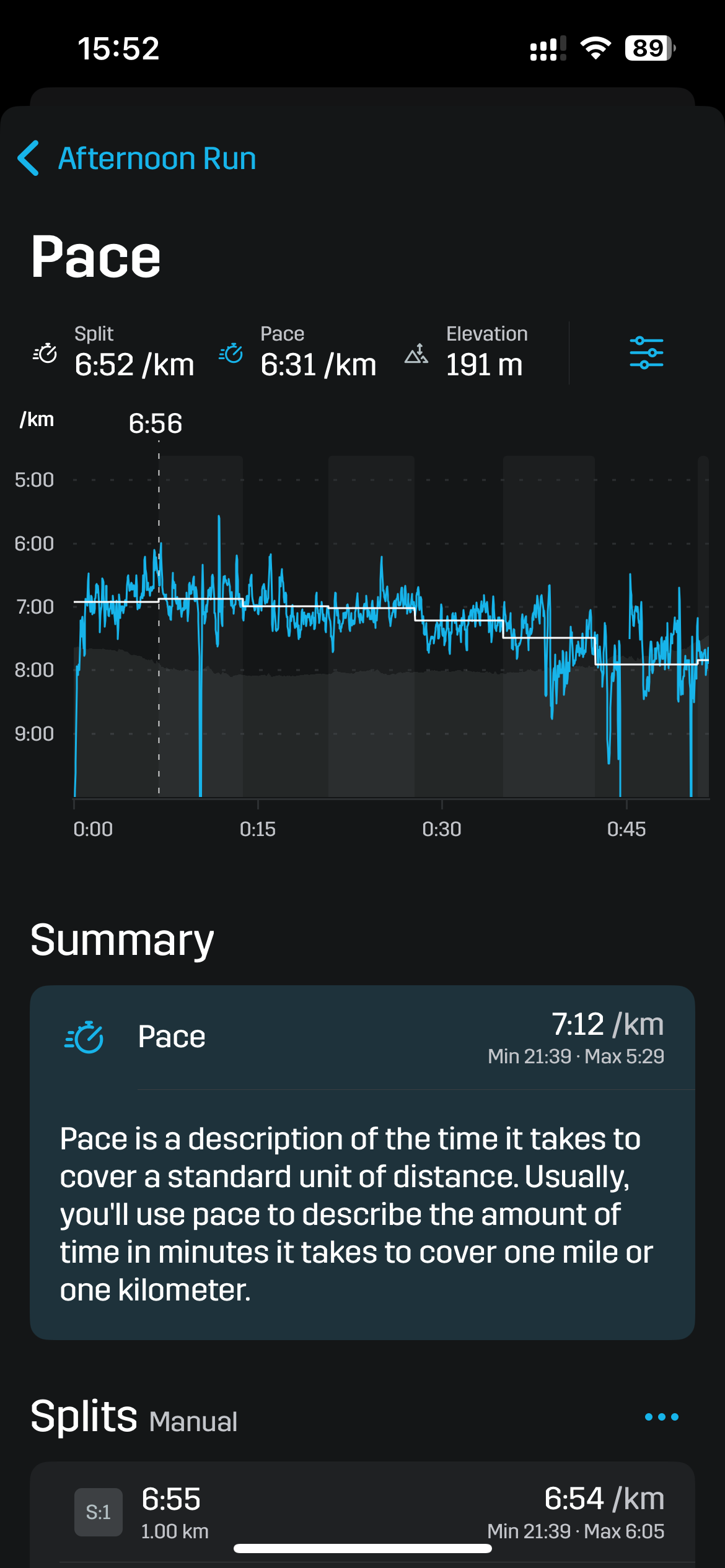
The time spent in pace zones is wrong when running with stryd.
As you can see in the screenshot from Stryd, I definitely spent time in the correct pace zone. In Athletica it says I did not spend any time in that zone. On the other hand I‘m pretty sure I did not run fast enough to spend any time in pace zone 4 and 5 on my easy run. Nevertheless athletica says I spent 7 and 8 minutes in those zones.
1 Like
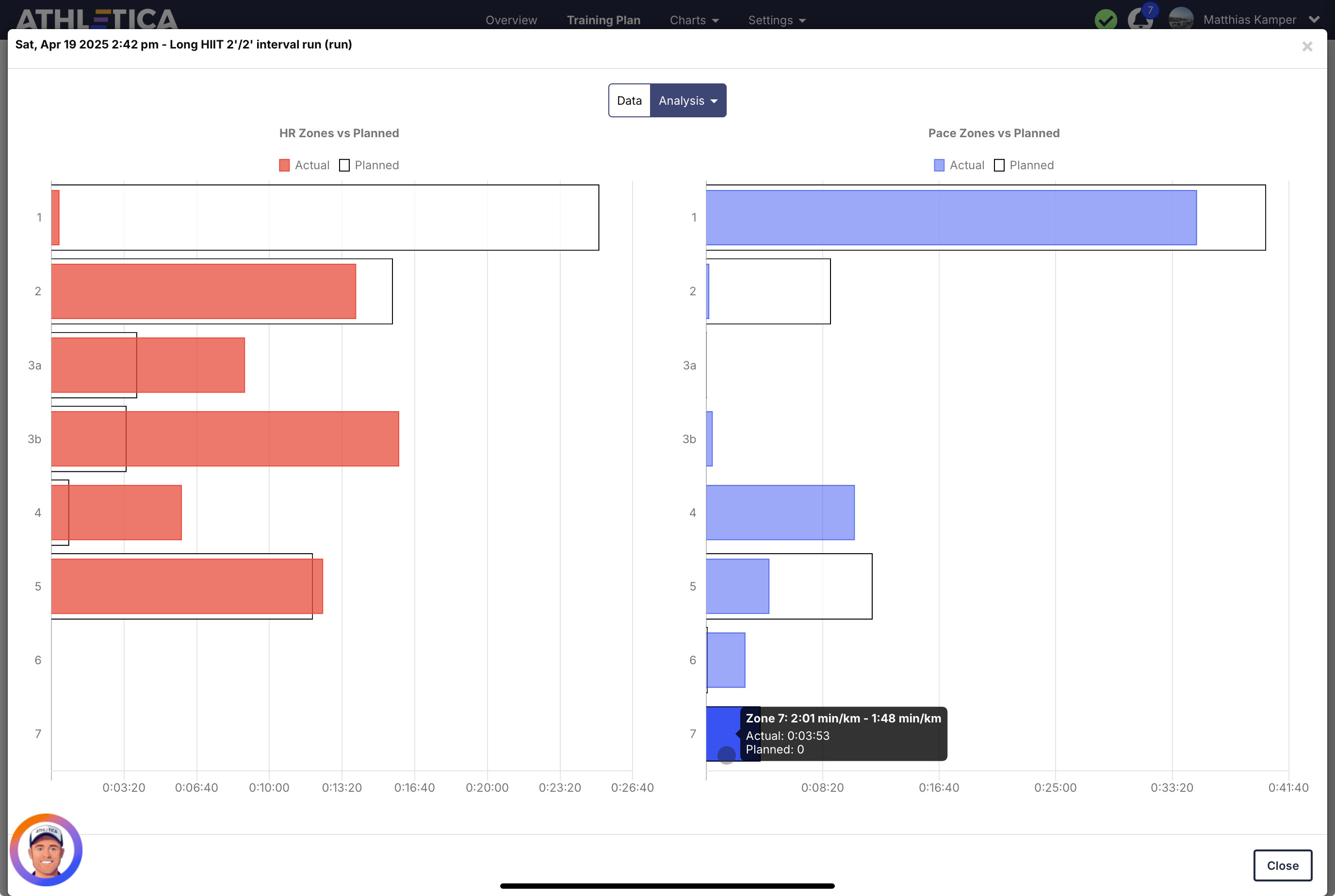
Same thing happened today. As you can see there are two bugs:
- Athletica is showing much faster pace than I actually did on my run and that is shown in correctly in the Stryd App
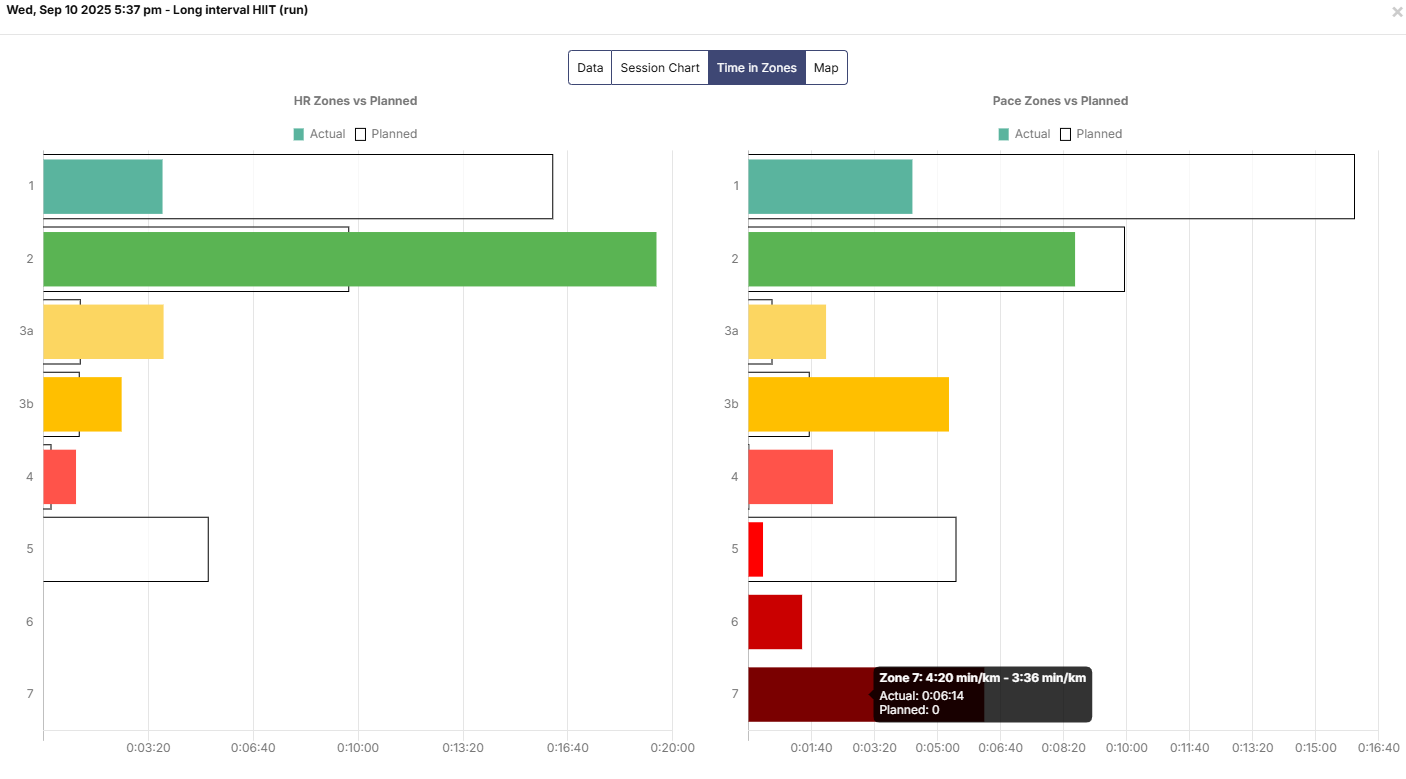
- The fastest pace in the Athletica pace chart is slower than 3:02 minutes per km, still it tells me I‘ve spent nearly 4 minutes in Pace Zone 7, which is 2:01 - 1:48 min/km
This is especially annoying as the AI coach always tells me I‘ve done a bad jog staying in the prescribed zones.
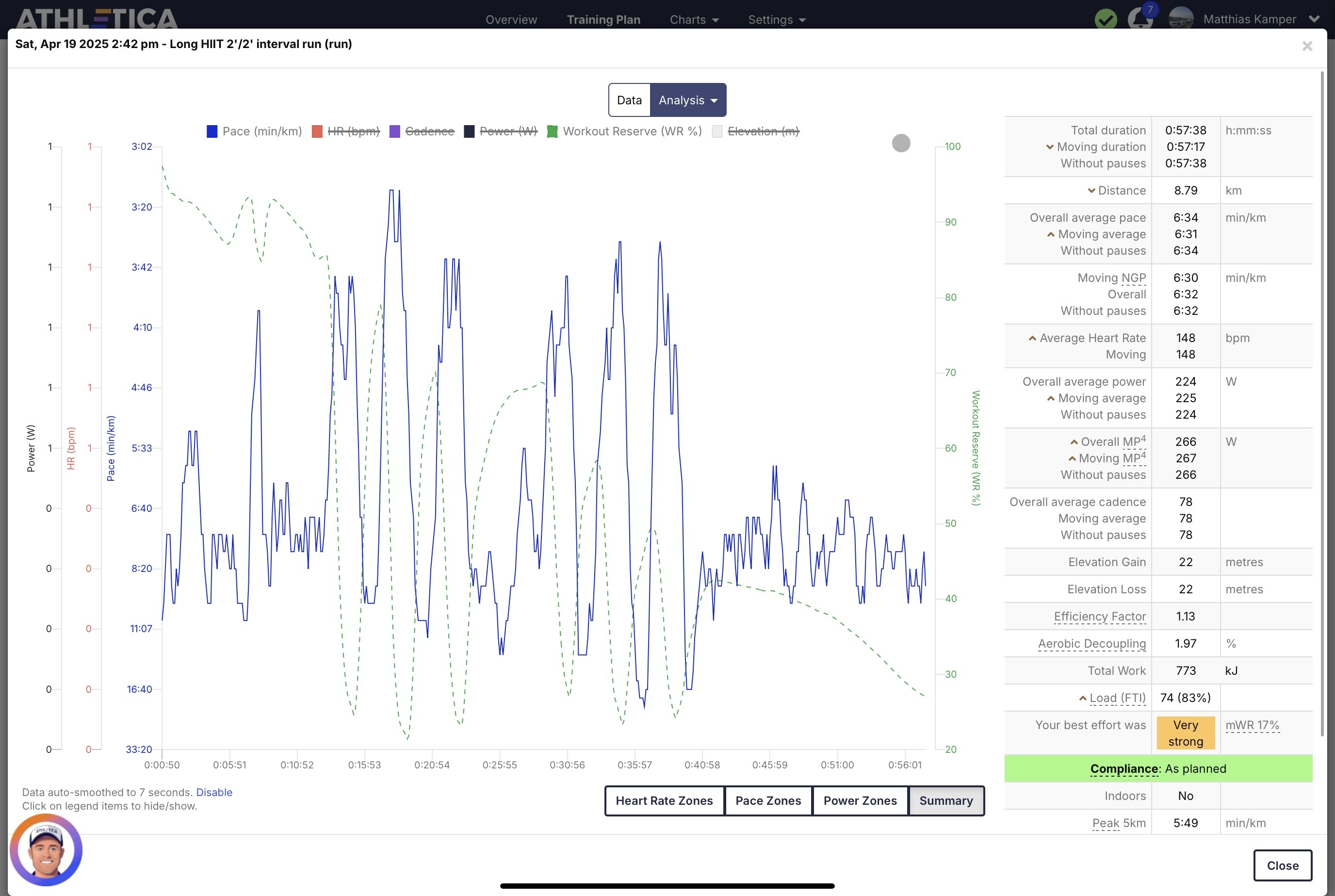
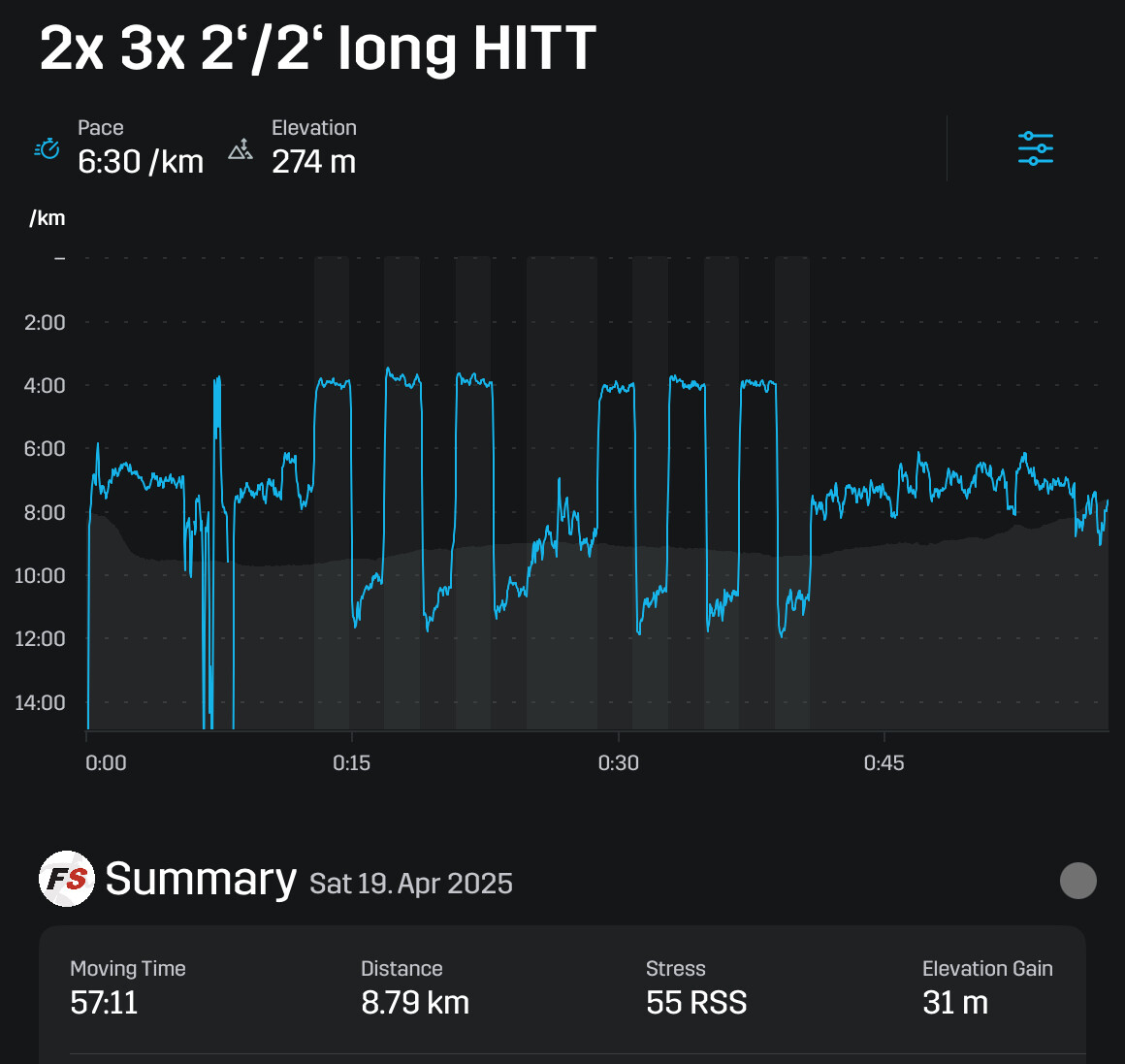
This is still not solved… I always get time in zones I never even touched - like in my 30/30s yesterday_

That’s also the case for aerobic runs:

I’m using a Garmin Forerunner 965 with the Stryd Duo and it’s set to use the pace and distance that the Stryd is reporting.
2 Likes
Thank you for bringing that up again! I‘ve reported this a few times now already with no change.
I’ve been using Athletica for about 1.5 months now, and during that time I’ve never seen the correct pace displayed for any of my runs. It doesn‘t matter if I run with Stryd or with the native Workout app on the Apple Watch. Regardless of the setup, the pace data in Athletica is consistently inaccurate/wrong.
1 Like
Same, my post workout pace zones in Athletica have been off for months and months. I get the same thing with significant time in pace zones that I didn’t come close to reaching. I download my Garmin data for every workout to about ten different fitness apps and all of them show the post workout pace zones correctly, with Athletica being the only exception. To take this a bit further, Athletica also doesn’t display running power data correctly, doesn’t display correct efficiency/decoupling on treadmill runs, and showcases non-moving total time in many spots. All of the other apps do all of those other things perfectly, with Athletica being the only exception…and many of those sites are free. It may not be a huge deal because I believe Athletic is using HR data and not pace data for computation of load and training plan changes, but would also be nice to display everything correctly. It would also be interesting to see if this if everyone is having these run pace/power issues, or if it’s limited to those using Stryd pace/power.
3 Likes
just coming back to this now.apologies this one has evaded my watchful eye 
Are you still experiencing this issue @Matthias @Harlerunner @mgiven ?
Yes, unfortunatly still the same for me (as also reported in another thread). Time in zones for pace is wrong for every single run - regardless of using Garmin + Stryd or just the watch.
1 Like
Thanks so much for continuing to flag this — you’re absolutely right that the current time-in-pace-zone reporting (especially on GPS-run data) isn’t always accurate, and it can create a ripple effect on load calculation and AI Coach feedback. We hear your frustration, and we agree: this is not good enough— especially for athletes like you who are training with precision and want to trust the data.
Here’s what we know:
 HR zones are accurate — so training load based on heart rate is still solid.
Pace zones can be skewed, especially by small GPS or footpod spikes that get interpreted as Z5–Z6 efforts, even in steady-state Z2–Z4 runs.
The resulting impact shows up in:
- Inflated time in high-intensity pace zones
- Misleading AI Coach comments
- Inconsistent Training Load feedback
We’ve had internal conversations with the dev team. We fully recognize that errors like this erode trust — and it’s especially important to us to fix them when they affect athletes who are advocating for the platform.
What we’re doing next:
- We’re reviewing the pace parsing logic, especially how spikes are smoothed or flagged.
- We’re investigating if we can apply smarter filtering without wiping out real sprint efforts.
- We’re also exploring quick wins in zone reporting while working on a more robust long-term fix.
In the meantime, please know:
- If you’re training with HR, your load progression is still valid.
- If you’re seeing pace zone misclassifications, you’re not alone — and it’s not your fault.
- You can manually override threshold suggestions if they’re clearly misaligned (and we’re working to prevent these from being triggered unnecessarily).
We also welcome any session examples that show this issue clearly — they help us cross-reference and accelerate solutions. Screenshots are GOLD!
Thank you again for being such a dedicated part of this community. We’re listening, we’re on it — and we’re committed to closing this loop.
MJ
Yep, same for me. I’ve never had one run where the pace zones are accurate. They always show time spent in zones 3/4/5/6/7 when I’ve never come close to approaching that. My setup is the same for the 8-10 sites that my Garmin data loads to, and Athletica continues to have issues with the zones, where they others do not.
1 Like
Here’s my Z2 run from today. It was very humid and a hilly run, so HR touched Z3 for some time and pace dipped into Z3 for downhills:
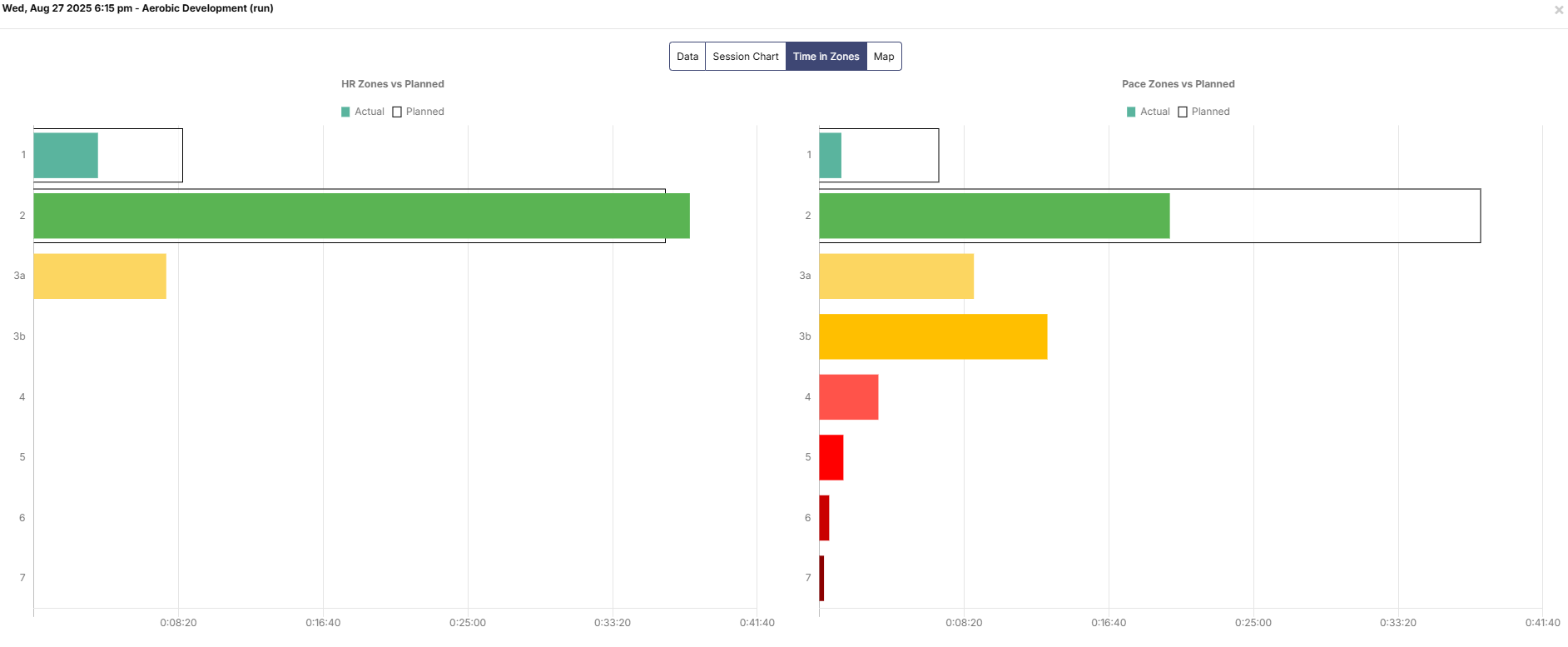
If I check intervals.icu for the same run, there’s about 1 min in a pace range, that would be Z4 in athletica (but nothing above that). But athletica has about 6 min in Z4 and higher.
Here’s a link to my original Garmin file.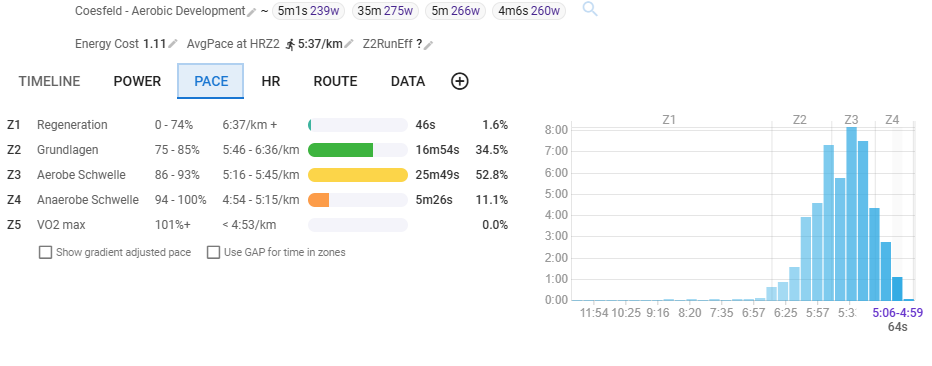
Hmm… this seems to get worse with pace:
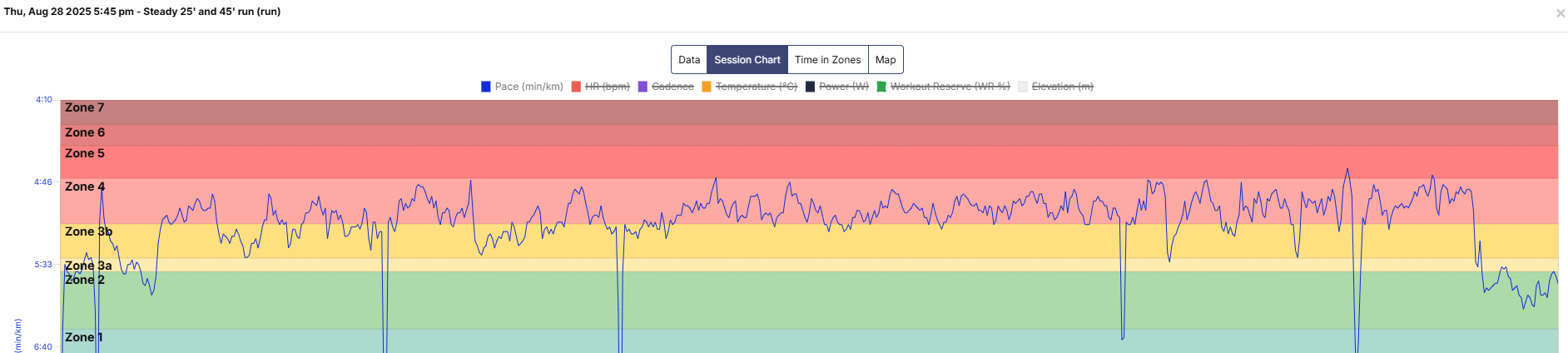
Spend most of my time in Z4 today, dipping into Z5.
But I get more than 15 minutes above Z4 in “time in zones”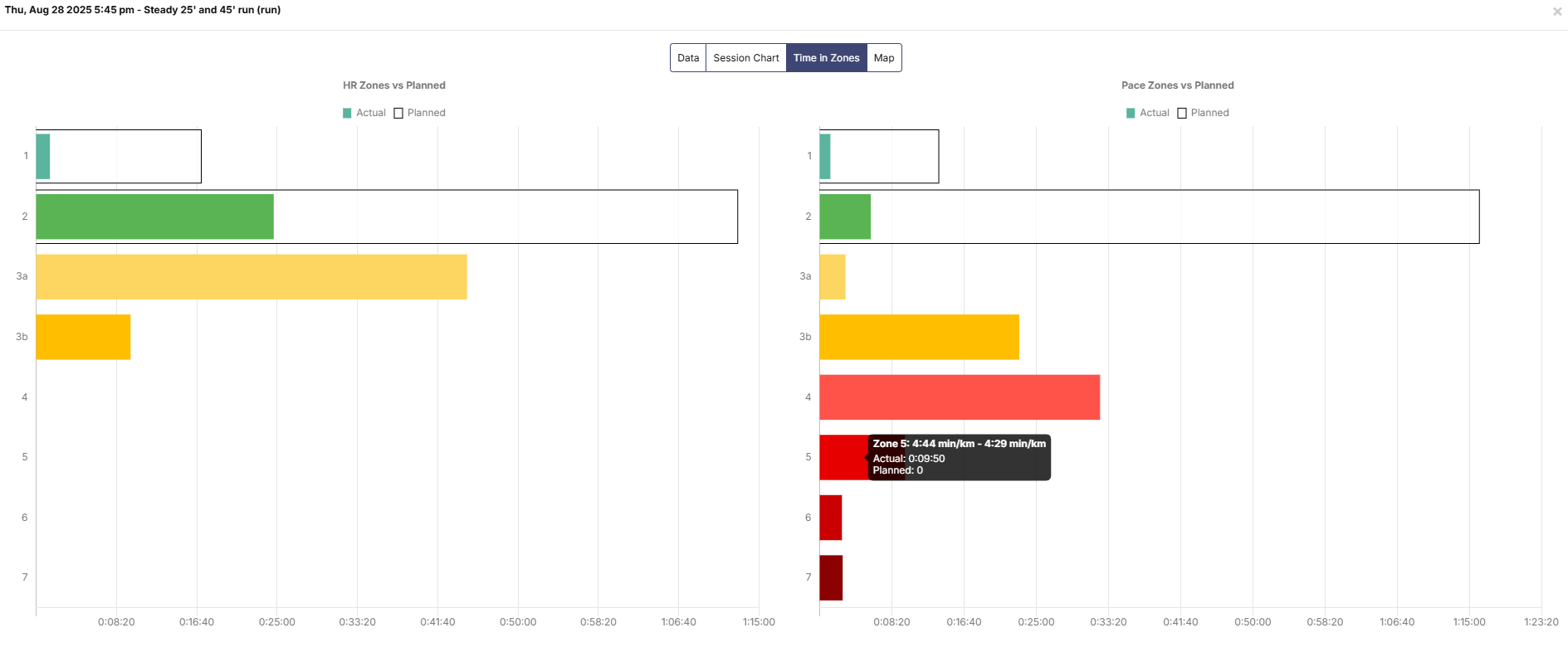
I thought this was a Garmin problem, but running with my Suunto today (Pace 2) I see wrong time in zones, too.
@Harlerunner could you please create a ticket at support.athletica.ai with screenshots from both Suunto/Strava and Athletica if you believe this is a bug/error on our side. It helps me keep track of and reply to you personally  Appreciate you!
MJ
1 Like